Open Graph is a metadata standard that tells social platforms, messaging apps, and collaboration tools how a web page should appear when someone shares its URL.
If you have ever pasted a link into Facebook, LinkedIn, Slack, Discord, WhatsApp, or iMessage and seen a rich preview card with a title, description, image, and URL, you have seen Open Graph at work.
For ecommerce stores, SaaS products, blogs, portfolios, and documentation sites, Open Graph is not just a technical detail. It helps control the first impression your link makes before a person decides whether to click.
What Is Open Graph?
Open Graph is a set of HTML meta tags placed inside the <head> of a page. These tags describe the page for link preview crawlers.
A basic Open Graph setup looks like this:
<meta property="og:title" content="Prestige GMT Automatic Watch" />
<meta property="og:description" content="A premium travel watch with dual-time precision." />
<meta property="og:image" content="https://example.com/og/prestige-gmt.jpg" />
<meta property="og:url" content="https://example.com/products/prestige-gmt" />
<meta property="og:type" content="product" />
When a platform crawls the URL, it reads these tags and uses them to build the preview card.
Without Open Graph tags, platforms may guess. They might choose the wrong title, crop a random image, show a weak description, or display no image at all. That makes the shared link look unfinished, even when the page itself is strong.
Why Open Graph Matters
Open Graph gives you control over how your content travels outside your website.
Most people do not discover a page by carefully reading its full URL. They discover it in feeds, group chats, newsletters, community posts, customer support threads, and team workspaces. In those places, a preview card has to communicate value quickly.
A strong Open Graph preview can:
- make a link look more trustworthy
- explain what the page is about before the click
- increase visual consistency across social channels
- make product pages easier to understand when shared
- reduce the chance that platforms choose the wrong image
- support campaigns, launches, and seasonal offers with clearer visuals
Open Graph does not replace good page content, SEO, or product positioning. It improves how that content is represented when the page is shared.
The Most Important Open Graph Tags
You do not need dozens of tags to start. Most pages should begin with these five.
og:title
og:title is the headline shown in the preview card.
Use a clear title that matches the page. For product pages, include the product name. For articles, use the article title. For landing pages, use the offer or page topic.
<meta property="og:title" content="Prestige GMT Automatic Watch" />
og:description
og:description gives a short summary of the page.
Keep it specific. Avoid generic copy like “Welcome to our website.” A good description gives people a reason to click.
<meta property="og:description" content="A premium travel watch with dual-time precision and sapphire glass." />
og:image
og:image controls the main preview image.
This is usually the most visible part of the card. A custom image often performs better than a random product photo or logo because it can combine product imagery, readable text, brand color, and campaign context.
<meta property="og:image" content="https://example.com/og/prestige-gmt.jpg" />
og:url
og:url tells platforms the canonical URL for the page.
<meta property="og:url" content="https://example.com/products/prestige-gmt" />
og:type
og:type describes the kind of page.
Common values include website, article, and product.
<meta property="og:type" content="product" />
Why Open Graph Is Useful for Ecommerce Product Pages
Ecommerce product pages are shared in many places: social ads, organic posts, affiliate links, customer messages, influencer content, wish lists, and support conversations.
When a product URL is shared, the preview card can influence whether someone pauses or ignores it.
For ecommerce, Open Graph helps you show:
- the product name
- the product image or styled product preview
- a short benefit-focused description
- a seasonal sale message
- brand identity
- product category or collection context
Imagine a store selling a travel watch. A weak preview might show a cropped product thumbnail with no context. A stronger Open Graph image could show the watch, the product name, a short feature line, and the brand style. The page is the same, but the shared link feels more polished and easier to trust.
That matters because social feeds and messaging apps are crowded. People often decide whether to open a product link before they ever reach the product page.
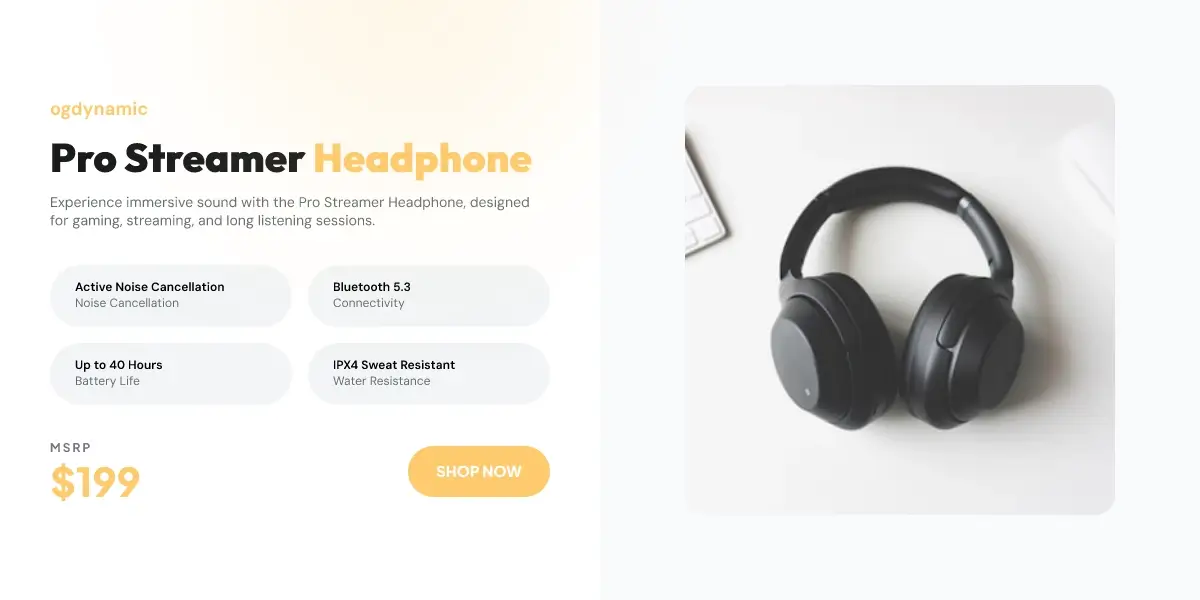
The example above shows the kind of product-focused preview that works well for ecommerce sharing: the product is visible, the message is short, and the layout is designed for a link preview card rather than a full product page.
Open Graph Examples for Ecommerce
Here is a simple ecommerce product example:
<meta property="og:title" content="Prestige GMT Automatic Watch" />
<meta property="og:description" content="A luxury travel watch with dual-time precision, sapphire glass, and a stainless steel case." />
<meta property="og:image" content="https://example.com/og/prestige-gmt-watch.jpg" />
<meta property="og:url" content="https://example.com/products/prestige-gmt-watch" />
<meta property="og:type" content="product" />
Here is a sale-focused version:
<meta property="og:title" content="Prestige GMT Watch - Spring Sale" />
<meta property="og:description" content="Save on a premium travel watch built for daily wear and international trips." />
<meta property="og:image" content="https://example.com/og/prestige-gmt-spring-sale.jpg" />
<meta property="og:url" content="https://example.com/products/prestige-gmt-watch" />
<meta property="og:type" content="product" />
The second version is useful when the shared link supports a campaign. It gives the preview a clearer reason to click.
Open Graph for Blogs, SaaS, and Other Pages
Open Graph is useful beyond ecommerce.
For blog posts, it helps make articles more clickable when shared on LinkedIn, X, Slack, or newsletters. The preview image can include the article title, topic, and brand.
For SaaS pages, it can explain features, integrations, comparison pages, and changelogs in a visual way. A feature page shared with a polished preview looks more credible than one with a random screenshot.
For portfolios, it helps each project preview look intentional. Designers, developers, photographers, and agencies can show the project name, visual style, and category before someone clicks.
For documentation, it makes docs links easier to recognize inside team chats and support threads.
Open Graph and SEO
Open Graph tags are not a direct Google ranking factor in the same way page title, content quality, internal links, and technical crawlability matter. But Open Graph can still support SEO indirectly.
Better previews can lead to more clicks from social platforms, communities, private messages, and newsletters. Those visits can bring more readers, customers, mentions, backlinks, and branded searches over time.
Open Graph also supports consistency. When every important page has a strong title, description, and image, your brand looks more intentional wherever links appear.
For SEO teams, Open Graph belongs in the same checklist as title tags, meta descriptions, canonical URLs, schema markup, and image optimization. It is part of making a page easier to understand and easier to share.
Open Graph vs Twitter Cards
Open Graph is widely used by platforms like Facebook, LinkedIn, Slack, Discord, and many messaging apps. Twitter Cards are similar metadata tags used by X and some related preview systems.
A page can use both:
<meta property="og:title" content="How to Improve Product Link Previews" />
<meta property="og:description" content="A practical guide to better ecommerce social previews." />
<meta property="og:image" content="https://example.com/og/product-preview.jpg" />

<meta name="twitter:card" content="summary_large_image" />
<meta name="twitter:title" content="How to Improve Product Link Previews" />
<meta name="twitter:description" content="A practical guide to better ecommerce social previews." />
<meta name="twitter:image" content="https://example.com/og/product-preview.jpg" />
In many cases, the same image can work for both. For more precise control, you can use a separate Twitter image.
Best Practices for Open Graph Images
The image often determines whether a preview card looks strong or weak.
Use these rules:
- Start with 1200 x 630 pixels for standard Open Graph previews.
- Use an absolute HTTPS image URL.
- Keep important text away from the edges.
- Make the text readable on mobile.
- Use real page context, not a generic stock image.
- Match the image to the page title and description.
- Keep branding visible but not overwhelming.
- Test the URL after publishing.
For ecommerce, avoid using only a plain product photo if the product needs context. A designed preview can show the product and communicate why it matters.
Common Open Graph Mistakes
The most common mistakes are simple but costly:
- missing
og:image - using a relative image URL instead of an absolute URL
- using an image that is blocked from crawlers
- using an image that is too small
- using unreadable text in the image
- setting the same generic preview on every page
- forgetting to update previews for campaign pages
- not checking how the preview looks after deployment
If your preview shows the wrong image, the platform may have cached an older version. Use platform debugging tools or an OG checker to inspect what crawlers currently see.
How to Check Open Graph Tags
You can check a page manually by viewing the HTML source and searching for og: tags.
You can also use an Open Graph checker to fetch the page and preview the detected tags. A checker is useful because it shows what crawlers are likely to read, not just what you expect to be present.
When checking a URL, look for:
og:titleog:descriptionog:imageog:urlog:type- image load errors
- missing image alt text
- redirects or inaccessible pages
If you want to test a page quickly, use the OG checker to inspect the detected Open Graph image and preview metadata.
How ogdynamic Helps
ogdynamic helps you create branded Open Graph images from reusable templates.
For ecommerce, that means product pages can have preview images that match the product, campaign, and brand without manually designing every card from scratch.
For blogs and content teams, it means every article can have a readable, consistent preview image.
For SaaS and product teams, it means feature pages, documentation, changelogs, and landing pages can share with a polished visual preview.
You can use a generated design URL directly in your meta tags, and supported templates can accept query parameters for page-specific text, images, or output format.
Open Graph Setup Checklist
Use this checklist before publishing an important page:
- Add
og:title. - Add
og:description. - Add an absolute HTTPS
og:image. - Add
og:url. - Set the correct
og:type. - Add Twitter Card tags if you care about X previews.
- Use a 1200 x 630 image for standard previews.
- Make sure crawlers can access the page and image.
- Test the URL with an Open Graph checker.
- Update the image when the page or campaign changes.
Open Graph is a small part of your HTML, but it has a large impact on how your pages appear across the web. If people share your links, Open Graph is worth getting right.