Event links need to communicate energy, urgency, and logistics at the same time. A concert, festival, launch party, meetup, or live show can have a great landing page, but if the shared preview looks plain, the event can feel less exciting before anyone clicks.
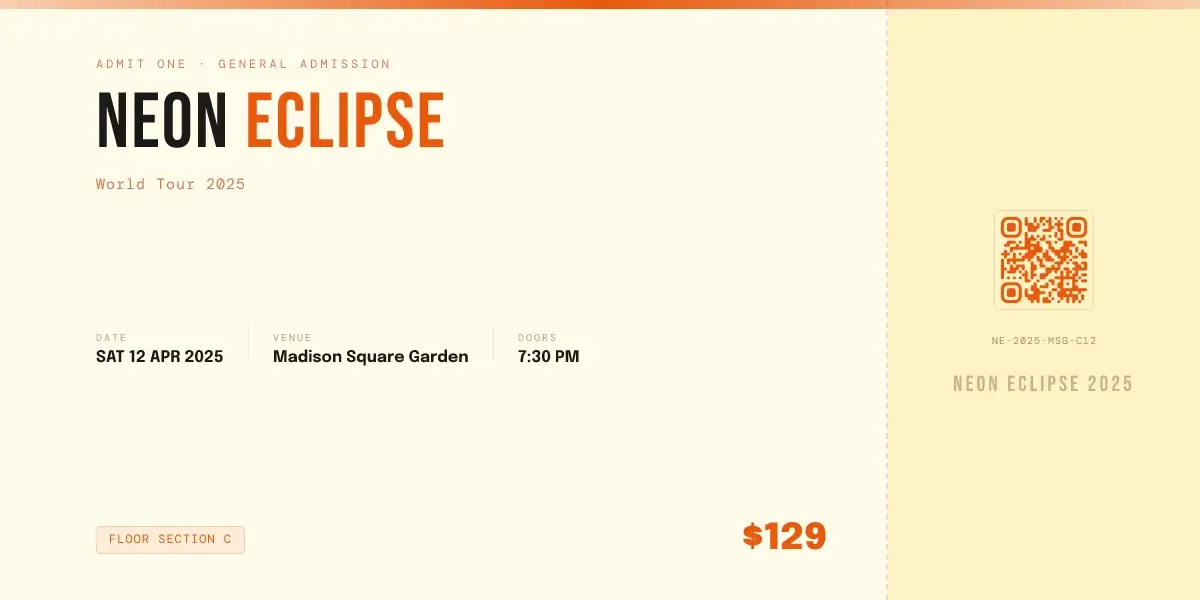
The Event Ticket template in ogdynamic turns an event link into a ticket-style Open Graph image. It is designed for event pages that need to show the event name, date, venue, ticket section, price, and ticket identity in one memorable preview.
What Is the Event Ticket Template?
The Event Ticket template is a social preview layout inspired by physical ticket stubs. It uses bold event typography, structured detail blocks, a ticket section label, pricing, a ticket code, and QR-style artwork to make the shared link feel event-specific.
It can be used for:
- concerts
- festivals
- parties
- conferences
- workshops
- meetups
- launch events
- private experiences
- ticketed webinars
The goal is simple: make the link look like an event people can attend, not just another generic web page.
The Problem It Solves
Many event pages rely on a poster, hero image, or venue photo as the social preview. That can work, but it often fails when the image is cropped into a wide Open Graph card.
The Event Ticket template solves several common problems.
Event Details Get Lost
People need to know the event name, date, venue, and time quickly. If that information is hidden in a poster or page description, the social preview has to work too hard.
This template brings the essential event details into the image itself.
Posters Do Not Always Crop Well
Event posters are often vertical. Open Graph images are wide. When a vertical poster is used as a social preview, the crop can remove the artist name, date, or callout text.
The ticket layout is built for wide preview cards, so the information fits the format from the start.
Ticketed Events Need More Urgency
A ticket-style image signals that the page is actionable. It feels closer to an admission pass than a generic announcement.
That visual cue can help concert pages, event sales pages, and registration pages feel more immediate.
Shared Links Look Too Similar
If every event uses the same brand logo or venue image, individual events become hard to distinguish. A ticket-style layout lets each event have a unique name, price, code, and details while staying on brand.
Template Review: Layout and Visual Direction
The Event Ticket template uses a horizontal ticket composition.
The main ticket area includes:
- eyebrow text such as admission type
- large event name
- short event description
- date, venue, and doors or start time
- section label
- price
The ticket stub area includes:
- stub title
- QR-style artwork
- ticket code
This structure creates a strong event signal. The preview does not just say "event." It looks like something tied to entry, attendance, and a specific date.
The default style uses warm ticket-stock colors, orange accents, bold condensed display type, and compact mono details. It is especially well suited for concerts, entertainment events, nightlife, creator events, pop-ups, and high-energy announcements.
What Fields You Can Customize
The template uses editable event and ticket fields, so you can reuse the same design for different events.
You can customize:
- eyebrow text such as ticket type or admission level
- event name
- event description
- detail blocks such as date, venue, doors, city, or time
- ticket section
- price
- ticket code
- stub title
- QR-style image
- background color
- accent color
- ticket stub color
This keeps the image flexible for both free and paid events. If the event is free, the price field can become "Free," "RSVP," or "Invite Only."
How to Use the Event Ticket Template
Use this workflow when publishing an event page:
- Add an eyebrow that explains the ticket type or event category.
- Add the event name in a short, readable format.
- Add a concise event description.
- Add the date, venue, and doors or start time.
- Add the section, price, or RSVP status.
- Add a ticket code or event code if useful.
- Add QR-style artwork if the event page supports it.
- Generate the image.
- Use the generated image URL in the event page's
og:imagetag.
Example meta tags:
<meta property="og:title" content="Neon Eclipse World Tour 2025" />
<meta property="og:description" content="Tickets for Neon Eclipse at Madison Square Garden. Doors open at 7:30 PM." />
<meta property="og:image" content="https://example.com/og/neon-eclipse-ticket.jpg" />
<meta property="og:url" content="https://example.com/events/neon-eclipse-msg" />
<meta property="og:type" content="website" />
For X cards:
<meta name="twitter:card" content="summary_large_image" />
<meta name="twitter:image" content="https://example.com/og/neon-eclipse-ticket.jpg" />
For a broader implementation walkthrough, read the OG image meta tag guide.
Best Use Cases
Concerts and Live Shows
The ticket styling works naturally for concerts because it mirrors the object people expect to receive after buying admission.
Festivals and Nightlife Events
Festival and nightlife links need immediate visual energy. The bold event name and warm accent system help the preview feel promotional without becoming cluttered.
Product Launch Events
For SaaS launches, creator launches, or brand events, the ticket format can make a launch page feel like a live moment rather than a static announcement.
Meetups and Workshops
For community events, the detail blocks can highlight date, venue, city, and start time clearly.
Limited-Capacity Experiences
The section, price, and ticket code fields can help communicate scarcity or exclusivity for invite-only dinners, private sessions, and pop-up experiences.
SEO Value for Event Pages
The Event Ticket template is not a replacement for strong event SEO. Your page still needs a clear title, indexable event details, useful copy, internal links, and crawlable metadata.
But a better event preview can support distribution by improving:
- clicks from social posts
- shares from performers, speakers, sponsors, or attendees
- credibility when links appear in group chats
- repeat recognition for recurring events
- engagement around event announcements
If more people click and share your event page, the page has a better chance to build momentum.
For most event pages, use the standard 1200 x 630 pixels Open Graph format. See the OG image size guide for sizing and readability guidance.
Event Ticket Preview Checklist
Before publishing, check:
- Is the event name readable at small sizes?
- Are the date, venue, and time correct?
- Does the price or RSVP status match the page?
- Is the ticket section useful, or should it be removed?
- Is the QR-style image decorative, functional, or intentionally omitted?
- Does the design match the event's energy?
- Is the generated image used in the page's
og:imagetag? - Has the final URL been tested after publishing?
Final Verdict
The Event Ticket template is best for event pages that need a more memorable social preview than a standard banner or poster crop. It turns event metadata into a visual ticket, which makes the link feel specific, timely, and more clickable.
Use it for concerts, launch events, meetups, workshops, festivals, and any event where attendance details matter.
To create a preview with this kind of layout, open the template-based image builder. For Open Graph fundamentals, start with What Is an OG Image?.