Podcast episodes are shared everywhere: LinkedIn posts, X threads, newsletter roundups, guest promotion kits, community channels, and private group chats. But many podcast links still appear with a generic cover image, a cropped logo, or a preview that does not explain why the episode is worth opening.
The Podcast Episode template in ogdynamic is built to fix that problem. It creates a clear Open Graph image for individual podcast episodes, not just for the show as a whole. That difference matters because every episode has a different topic, guest, promise, and audience angle.
This template is especially useful for podcast hosts, media teams, interview shows, founder podcasts, creator-led brands, and SaaS teams that publish audio or video interviews.
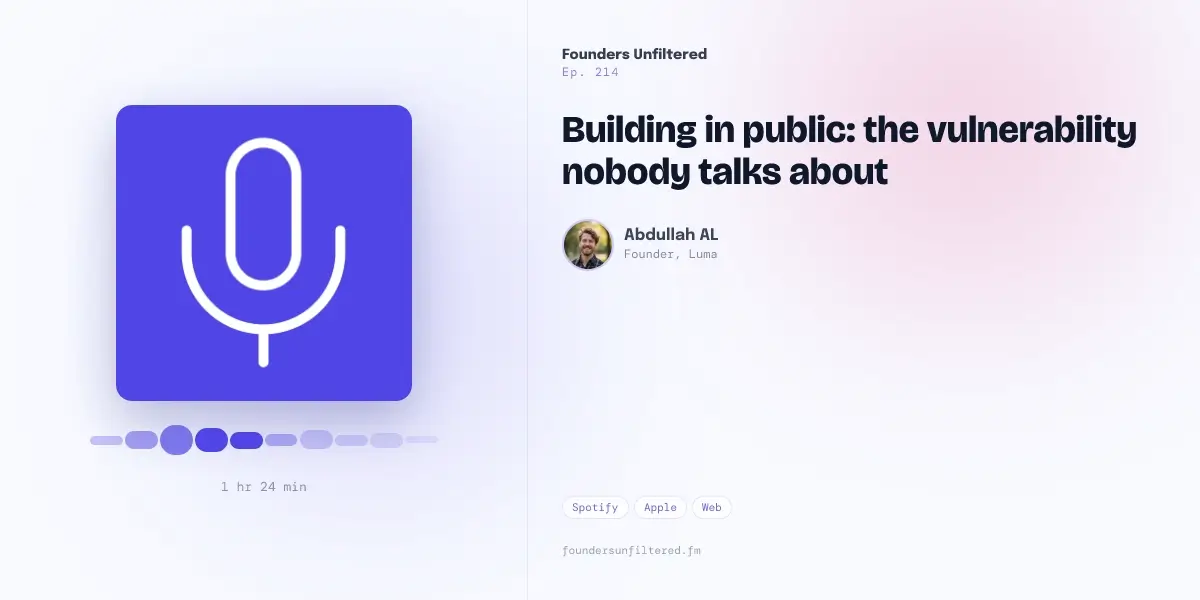
What Is the Podcast Episode Template?
The Podcast Episode template is a clean social preview layout designed for episode pages. It combines podcast artwork, episode metadata, guest or host details, listening platforms, and a strong episode title into one shareable image.
Instead of showing only the podcast cover, the template gives the shared link enough context to communicate:
- what show the episode belongs to
- which episode is being promoted
- what the episode is about
- who is featured
- how long the episode is
- where listeners can find it
- which website or show domain owns the content
That makes the preview more useful in social feeds and messaging apps where people decide quickly whether a link is worth clicking.
The Problem It Solves
Most podcast preview images fail because they treat every episode the same.
A podcast cover is useful for brand recognition, but it rarely explains the value of a specific episode. If someone shares episode 214 about building in public, the preview should communicate that topic clearly. If someone shares an interview with a founder, author, or industry expert, the preview should make the guest feel intentional and credible.
The Podcast Episode template solves four common problems.
Generic Episode Links
Without a custom og:image, platforms may use the same show artwork for every episode. That makes each shared link look identical, even when the topics are completely different.
The Podcast Episode template gives each episode a unique preview while keeping the show identity consistent.
Cropped or Unreadable Artwork
Podcast cover art is often square. Open Graph previews are usually wide. When a square cover is forced into a wide card, important text or artwork can be cropped, stretched, or pushed into a layout that was never designed for social previews.
This template keeps the artwork contained in a clean square area while using the rest of the wide canvas for the episode title and metadata.
Missing Guest Context
Interview episodes often get clicks because of the person featured. A generic podcast image hides that context.
The template includes fields for the speaker name, role, and avatar, so guest-driven episodes can signal credibility immediately.
Weak Social Differentiation
Podcast feeds are crowded. Founder interviews, creator interviews, and industry podcasts often use similar cover art patterns. A strong episode-specific OG image helps the link stand out without needing a full custom design for every release.
Template Review: Layout and Visual Direction
The Podcast Episode template uses a balanced split layout.
On the left, it places the episode artwork in a large square frame with soft depth and a simple audio-wave style accent below it. This area gives the image an immediate podcast cue without making the preview feel busy.
On the right, it uses a structured editorial layout:
- show title at the top
- episode number below it
- large episode headline
- speaker avatar and role
- platform pills near the bottom
- website URL as a subtle trust cue
The design works because it does not try to turn the OG image into a full episode description. It gives the viewer just enough information to understand the link and click through.
The default styling uses a bright, calm background with violet and soft pink accent overlays. The typography feels modern and editorial, which makes it a strong fit for founder podcasts, interview shows, product-led media, and educational audio content.
What Fields You Can Customize
The template uses editable fields for the details that change from one episode to the next. That means the design can stay consistent while the episode content changes.
You can customize:
showTitlefor the podcast or series nameepisodeNumberfor episode numberingepisodeTitlefor the main episode headlinespeakerNamefor the guest, host, or featured personspeakerRolefor the guest title or short credentialspeakerAvatarUrlfor the guest or host imageartworkUrlfor podcast artwork or episode artdurationfor runtimeplatformsfor listening options such as Spotify, Apple, and WebwebsiteUrlfor the show domain or landing page- background, accent, and overlay colors
This structure is useful because it keeps the template reusable. You do not need to redesign the image each time you publish a new episode. You only update the episode-specific values.
How to Use the Podcast Episode Template
The simplest workflow is:
- Open the Podcast Episode template.
- Add your show title and episode number.
- Write a short, specific episode title.
- Add the guest or host name, role, and avatar.
- Add your podcast artwork or episode artwork.
- Set the duration and listening platforms.
- Generate the image.
- Use the generated image URL in your page's
og:imagetag.
The key is to keep the episode title readable. A social preview is not the place for a full podcast title with every keyword, guest credential, and subtitle. Use the page title for the full SEO title. Use the image for the clearest human-facing hook.
For the standard Open Graph implementation, add the generated image URL to your episode page:
<meta property="og:title" content="Building in Public: The Vulnerability Nobody Talks About" />
<meta property="og:description" content="A founder conversation about sharing work, handling uncertainty, and building trust in public." />
<meta property="og:image" content="https://example.com/og/podcast-episode-214.jpg" />
<meta property="og:url" content="https://example.com/podcast/building-in-public" />
<meta property="og:type" content="article" />
For X cards, use:
<meta name="twitter:card" content="summary_large_image" />
<meta name="twitter:image" content="https://example.com/og/podcast-episode-214.jpg" />
If you want the broader technical setup, read the OG image meta tag guide.
Best Use Cases
The Podcast Episode template is a strong fit for several types of content.
Interview Podcasts
If the guest is a major reason someone should click, use the speaker avatar and role fields. This makes the preview feel more personal and gives the episode instant context.
Founder and Startup Shows
Founder podcasts often depend on specific lessons, stories, and opinions. A custom episode preview helps each link communicate the topic instead of relying only on the show brand.
Educational Audio Series
For teaching-focused episodes, use the episode title to state the lesson clearly. For example, "How to Price Your First SaaS Plan" is stronger than a vague title like "Pricing Talk."
Branded Podcasts
Companies that publish podcast episodes can use this template to keep every episode on-brand while still making each preview unique.
Guest Promotion Kits
When a guest shares the episode with their audience, the preview should make them look good. A polished episode image gives guests a stronger asset to share and can improve distribution.
SEO Value of Better Podcast Preview Images
An OG image is not a direct ranking factor in the same way title tags, content quality, internal links, or crawlability are. But a better podcast social preview can still support SEO indirectly.
It can help by improving:
- social click-through rate
- branded search interest after people see the episode
- shareability from guests and listeners
- perceived trust when the link appears in communities
- consistency across episode landing pages
If your podcast episode pages already target search, the preview image supports distribution. Search brings people to the page. Social previews help the page travel.
For sizing guidance, use the standard OG image size guide. For most podcast episode pages, the safest default remains 1200 x 630 pixels.
Podcast Episode OG Image Checklist
Before publishing an episode preview, check:
- Is the episode title readable at small sizes?
- Does the preview explain what this specific episode is about?
- Is the show title visible without dominating the card?
- Is the guest or host information accurate?
- Is the artwork crisp and properly cropped?
- Are platform labels short enough to fit?
- Does the image match the brand of the podcast?
- Is the generated image referenced in the page's
og:imagetag? - Have you tested the final URL after publishing?
This checklist prevents the most common podcast preview issues: generic artwork, unreadable titles, cropped covers, and missing episode context.
Final Verdict
The Podcast Episode template is best for teams that want every episode link to look intentional without manually designing a new image from scratch. It solves the gap between static podcast cover art and episode-specific promotion.
Use it when your podcast episodes need clearer social previews, stronger guest promotion assets, and a more professional link appearance across LinkedIn, X, Slack, Discord, and messaging apps.
If your podcast publishes regularly, this template can become part of the release workflow: publish the episode, generate the preview, add the og:image, and share the link with confidence.
To create a preview with this kind of layout, open the template-based image builder. For Open Graph fundamentals, start with What Is an OG Image?.