When you share a link on X, LinkedIn, or Facebook, the image that appears in the preview can make or break your click-through rate. A compelling image gets clicks. A forgettable one gets scrolled past. Yet most small businesses, independent bloggers, and solo developers don't have a designer on staff or the budget to hire one for every piece of content they create.
That's exactly the problem ogdynamic solves.
The Silent Killer of Your Social Traffic
You've probably noticed this phenomenon: some links get clicked, others get scrolled past, even when the content seems equally compelling. The difference often comes down to one thing: the Open Graph image.
Open Graph (OG) images are the preview cards that appear when you share a link on social media. They're defined in your HTML using Open Graph meta tags, and platforms like Facebook, X, LinkedIn, and Pinterest use them to generate preview cards. When you share a link without specifying an OG image, platforms typically auto-generate one from your page's images, which rarely looks good.
Here's the thing about social feeds: they move fast. Users scroll through hundreds of pieces of content per session, making split-second decisions about what warrants attention. A blurry, generic image signals low effort. It tells scrollers "this link isn't worth your time." A sharp, on-brand image signals credibility and invites clicks.
But here's the catch: creating professional OG images traditionally means one of three paths:
- Hiring a designer: $50-500 per image, plus turnaround time measured in days
- Using Photoshop or Canva: Time-consuming, still requires design sense to get right
- Hoping the auto-generated preview looks decent: It usually doesn't
Each of these options has serious drawbacks for content creators who need OG images at scale—bloggers publishing multiple posts per week, stores launching new products constantly, marketers running concurrent campaigns.
How ogdynamic Changes This
ogdynamic gives you a library of professionally designed templates that you can personalize with your own content in seconds. No design skills needed. No expensive software. No waiting for a designer's availability.
The platform handles the entire workflow:
- Choose from conversion-ready templates designed by professional designers
- Fill in your content — your headline, description, branding, colors
- Generate and use — get a hosted URL or download directly
The result is professional-quality OG images that actually get clicked, without any of the traditional friction.
For E-commerce Stores: Product Images That Actually Convert
Imagine every product launch, flash sale, or new arrival getting a perfectly sized, branded Open Graph image. Instead of spending hours in design tools or waiting days for a designer's quote, you fill in your product details, pick a template, and generate an image in seconds.
Store teams use ogdynamic to make their products stand out in shared links. When you share a new product on Instagram Stories, Facebook, or Pinterest, the preview card becomes a mini advertisement for your product. A compelling product OG image makes the offer clearer and the product easier to trust at a glance.
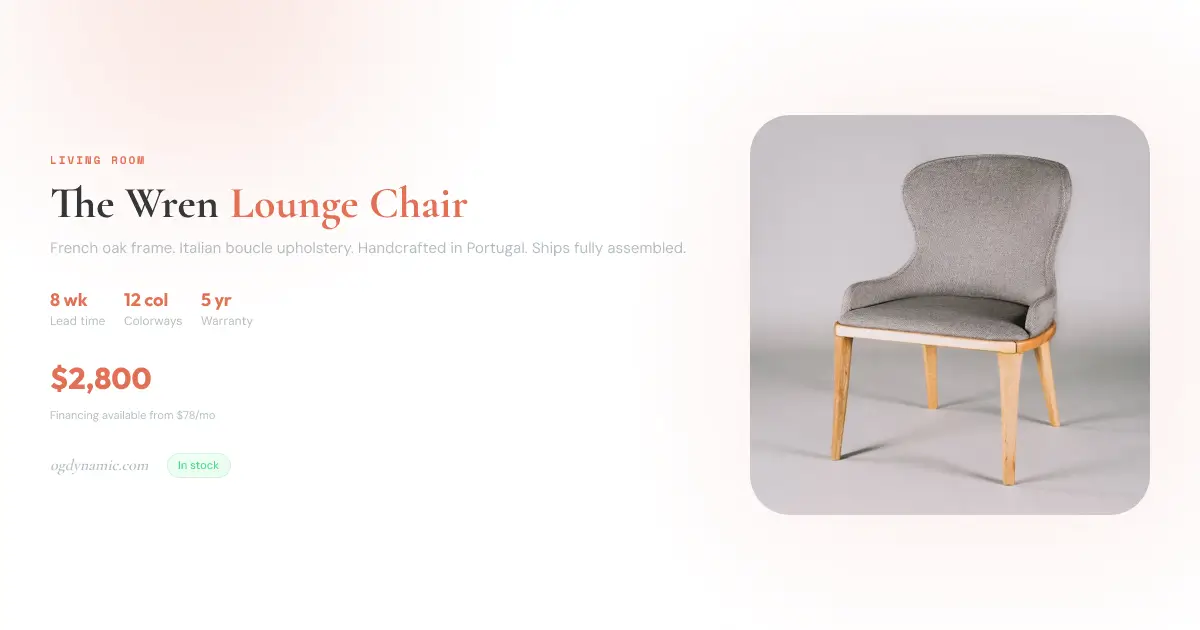
The right template gives the shared link a visual angle. It can feel editorial, product-focused, minimal, premium, or campaign-driven depending on what the page needs to communicate.
Key benefits for store owners:
- Consistent brand presentation: Every product image uses your brand colors and fonts
- Platform-optimized formats: Generate OG and X card sizes simultaneously
- Product-specific templates: Designs built specifically for e-commerce contexts
- Fast turnaround: Create an image in under 30 seconds
For Bloggers and Content Creators: Make Your Articles Unmissable
Every blogger knows this pain: you spent hours crafting a great article, but the social preview looks forgettable. You wrote a headline that converted in testing, but in a social feed it's invisible. Your article deserves better than an auto-generated preview that doesn't do it justice.
ogdynamic solves this by letting you:
- Choose a template that matches your content's tone and topic
- Fill in your title, subtitle, and brand elements in seconds
- Get a hosted URL or downloadable image ready to share immediately
Now your articles look as professional in a shared link as they do on your website. Your social previews become an extension of your content quality, not a downgrade from it.
For content creators publishing frequently, ogdynamic's brand presets are especially valuable. Save your logo, your primary and secondary colors, and your preferred fonts once, then apply them to every image you create. Each image stays on-brand with zero additional effort per image.
For Developers and Technical Content: Auto-Fill from URLs
One of ogdynamic's most powerful features is URL auto-fill. Paste a product page or blog post URL, and ogdynamic can extract key details—title, description, featured image—and pre-fill them into your template. Less manual work, more time for creating content.
This is especially valuable for:
- Aggregators and content curators who share others' content
- Social media managers managing multiple accounts
- Developers building automated sharing workflows
- Newsletters that link to external content regularly
Understanding Open Graph Protocol
Open Graph was originally developed by Facebook to allow web pages to become rich objects in the social graph. The protocol uses meta tags in your HTML to specify properties like title, description, image, and URL. When someone shares a link, platforms scrape these meta tags to generate preview cards.
The essential Open Graph meta tags are:
<meta property="og:title" content="Your Page Title" />
<meta property="og:description" content="Description of your page" />
<meta property="og:image" content="https://example.com/image.jpg" />
<meta property="og:url" content="https://example.com/page" />
<meta property="og:type" content="website" />
Without an OG image specified, platforms will scrape any images from your page and select one—often poorly. This is why explicitly setting your OG image is crucial for controlling how your content appears in social feeds.
The Three-Step Workflow
Getting started takes under a minute:
Step 1: Pick a template Browse our growing library of conversion-ready designs. Templates are organized by use case—product launches, blog posts, portfolio pieces, event announcements—so you can find the right starting point quickly.
Step 2: Fill in your content Enter your title, subtitle, branding information, and any other content. The interface shows you a live preview as you type, so you can see exactly how your OG image will look before generating.
Step 3: Copy the URL or download Your image is generated in under a second and hosted on our CDN for immediate use. Copy the URL to use in your Open Graph meta tags, or download the image file for direct upload to social scheduling tools.
That's it. No design skills. No expensive software. Just professional-looking Open Graph images that actually get clicked.
Common OG Image Mistakes to Avoid
While ogdynamic helps you create better images, it's worth understanding common pitfalls:
Resolution matters: Always use images at least 1200x630 pixels. Smaller images get stretched and look blurry.
Mobile-first text sizing: Your headline should be readable even when the preview card is tiny. What looks good on desktop might be illegible in a mobile feed.
Contrast is crucial: Light text on light backgrounds, or dark on dark, disappears on mobile screens. Test your images in bright light conditions.
Platform differences: Facebook, X, LinkedIn, and Pinterest all render OG images differently. ogdynamic generates multiple formats to account for this.
Integration Options for Developers
For developers building automated workflows, ogdynamic offers several integration options:
- API access for programmatic image generation
- Webhook notifications when images are ready
- URL-based generation with query parameters for content
- Direct meta tag injection for easy CMS integration
This makes ogdynamic suitable for platforms and tools that need to generate OG images at scale, not just individual content creators.
Ready to Stand Out?
Your social media links deserve images that do justice to your content. An OG image is often the first visual a potential reader or customer sees—make it count.
ogdynamic is free to use for getting started. Create an account and start generating OG images that make an impression. Your first image takes under a minute to create.
Want to see what's possible first? Open the image builder and start from a professional template. From minimalist product cards to bold editorial layouts, there's a template for every content type and brand aesthetic.
If you want to automate image generation next, see the documentation for GET and POST payload examples. For store-specific guidance, read Why Your Shopify Store Needs Better Open Graph Images.